Primary reference page
We keep one main article for the full 9-layer architecture so rankings and internal links stay focused.
Read the main architecture breakdownOpenClaw 9-Layer System Prompt Pattern
The complete 9-layer system prompt pattern used by OpenClaw. Includes bootstrap protocol, memory management, and skill loading architecture.
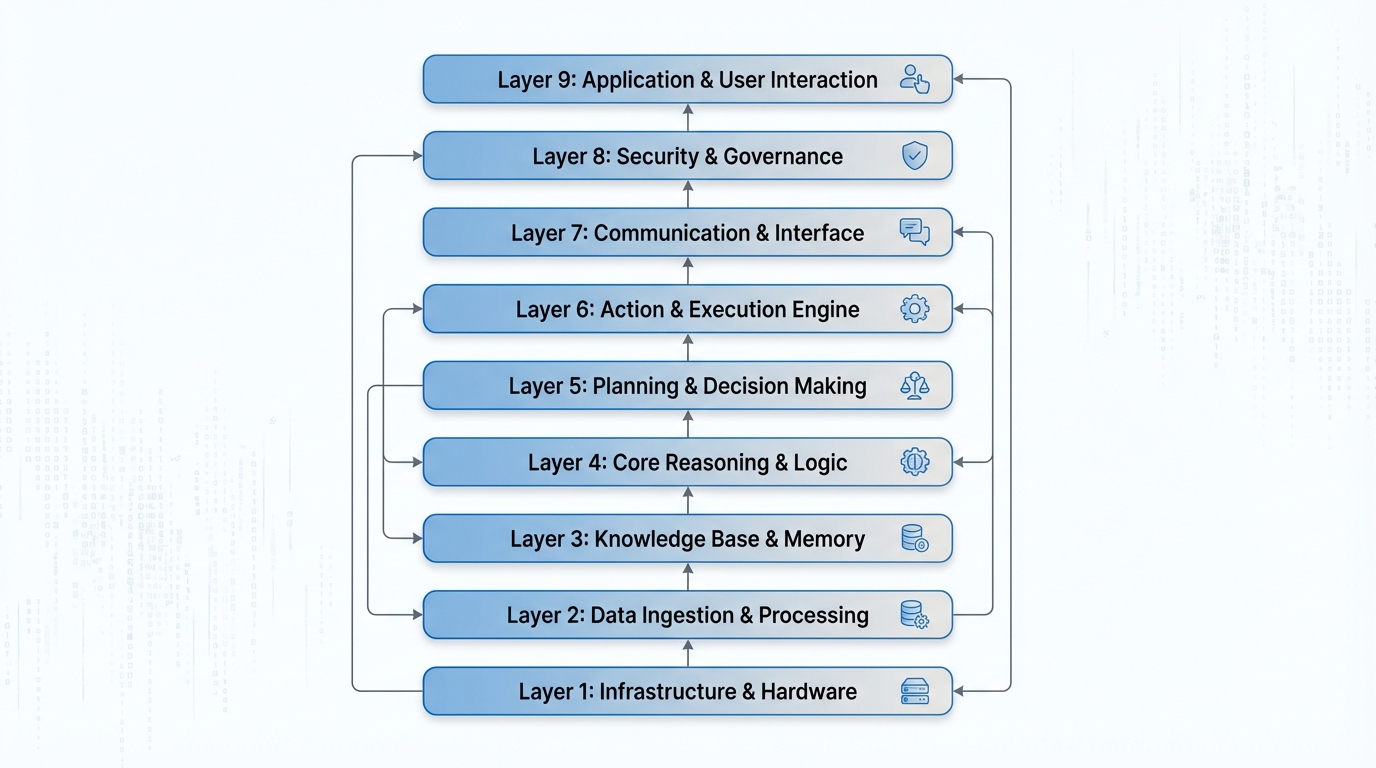
Inside OpenClaw: A Deep Dive into the 9-Layer Agent System Prompt Architecture
If you've ever wondered what actually goes into a production-grade AI agent's system prompt, you're in for a treat. OpenClaw's agent architecture takes a structured, layered approach to system prompt construction — one that balances framework consistency with developer flexibility. Let's break down all 9 layers, explore practical use cases, and figure out where you, as a developer, can actually intervene.
Why Architecture Matters for Agent System Prompts
Most developers start their AI agent journey by writing a single, monolithic system prompt. It works — until it doesn't. As agents grow in capability, you quickly realize that a flat system prompt becomes unmaintainable. You need separation of concerns: some instructions belong to the framework, others to the user, and still others should be dynamically generated at runtime.
OpenClaw solves this by decomposing the system prompt into 9 distinct layers, each with a specific responsibility. The total compiled system prompt can exceed 150KB — a testament to how much structured context a production agent actually requires.
Layer 1: Core Instructions
This is the agent's DNA. Layer 1 defines the fundamental identity, capabilities, and behavioral rules that make OpenClaw behave consistently regardless of what's happening in layers above or below.
Think of it as the constitution of the agent — immutable and authoritative. It governs things like how the agent should handle ambiguous instructions, when it should ask for clarification versus proceeding autonomously, and what its ethical guardrails look like.
# Core Identity
You are OpenClaw, an intelligent software engineering agent...
# Behavioral Rules
- Never execute destructive operations without explicit confirmation
- Always prefer reversible actions over irreversible ones
...
Framework-controlled. Not user-editable.
Layer 2: Tool Definitions
Layer 2 is where the agent's hands are defined. Every tool available to the agent — file system operations, shell execution, web search, API calls — is described here as a JSON Schema definition.
{
  "name": "execute_shell",
  "description": "Execute a shell command in the workspace",
  "parameters": {
    "type": "object",
    "properties": {
      "command": {
        "type": "string",
        "description": "The shell command to execute"
      },
      "working_dir": {
        "type": "string",
        "description": "Working directory for command execution"
      }
    },
    "required": ["command"]
  }
}
These definitions tell the LLM precisely what tools exist and how to call them. The schema-first approach ensures that tool calls are structured and parseable — critical for reliable agent behavior.
Layer 3: Skills Registry
This is one of OpenClaw's more elegant features. The agent automatically discovers skills — specialized capability modules — from the ~/development/openclaw/skills/ directory at startup.
A skill might be a domain-specific set of instructions, a workflow definition, or a specialized tool bundle for tasks like "deploy to Kubernetes" or "write a database migration." The auto-discovery mechanism means you can drop a new skill file into the directory and it becomes available to the agent on the next run — no configuration required.
Layer 4: Model Aliases
Working with multiple LLM backends means juggling long, unwieldy model identifiers. Layer 4 provides a short-alias registry:
gpt4   → openai/gpt-4o
claude → anthropic/claude-opus-4-5
flash  → google/gemini-2.5-flash
This is particularly useful in multi-agent setups where different sub-agents might be routed to different models based on task complexity or cost considerations.
Layer 5: Protocol Specifications
This layer defines the interaction protocols that govern how the agent communicates — not what it says, but how it structures its communication. Three key protocols are defined here:
- Silent Replies: A mechanism for the agent to perform internal reasoning or tool calls without surfacing verbose output to the user
- Heartbeats: Periodic status signals for long-running operations, so users know the agent is still working
- Reply Tags: Structured XML-style tags that allow downstream parsing of the agent's responses
<thinking>
  Analyzing the codebase structure before proceeding...
</thinking>
<action>execute_shell</action>
<result>Operation completed successfully</result>
Protocol standardization is what separates a chatbot from a reliable, automatable agent.
Layer 6: Runtime Information
Every agent invocation gets a fresh snapshot of the current runtime environment injected into Layer 6:
Current Time: 2025-07-15T14:32:07Z
Active Model: anthropic/claude-opus-4-5
Environment: production
OS: Darwin 24.3.0 (Apple M3)
Working Directory: /Users/dev/my-project
This contextual grounding prevents the agent from making assumptions about the environment. A file path that's valid on Linux isn't necessarily valid on macOS. Knowing the current time allows the agent to reason about deadlines, log timestamps, and time-sensitive operations.
Layer 7: Workspace Files — Your First Control Point
Here's where developers get their hands on the wheel. Layer 7 injects user-editable static configuration files that live in your workspace:
- IDENTITY.md — Customize the agent's persona, tone, and domain expertise
- AGENTS.md — Define sub-agent roles and responsibilities
- MEMORY.md — Persistent memory that survives across sessions
- Additional project-specific context files
Want your agent to know that your team uses tabs over spaces, prefers functional programming patterns, and deploys to AWS? Put it in IDENTITY.md. Want it to remember that the staging database password rotates every 30 days? That goes in MEMORY.md.
These files are static — they're read at prompt-build time and remain constant for the session. For dynamic injection, you need Layer 8.
Layer 8: Bootstrap Hook System — Your Second Control Point
This is the most powerful user-controllable layer. The Bootstrap Hook System allows you to programmatically inject content into the system prompt at runtime through four mechanisms:
agent:bootstrap— The primary hook, runs a script that can inject arbitrary content into the system promptbootstrap-extra-files— Dynamically specify additional files to include based on runtime conditionsbefore_prompt_build— Execute logic immediately before the prompt is assembled, allowing last-minute context injectionbootstrapMaxChars— A safety configuration that caps how much content hooks can inject, preventing prompt bloat
A practical example: imagine an agent that needs to know the current state of your CI/CD pipeline before making code changes. You could write a before_prompt_build hook that hits your CI API, fetches the status of the last 5 builds, and injects that summary directly into the system prompt.
# .openclaw/hooks/before_prompt_build.py
import requests

def hook(context):
    ci_status = requests.get("https://ci.yourcompany.com/api/recent").json()
    return f"""
## Current CI Status
Last build: {ci_status['last_build']['status']}
Failing tests: {ci_status['failing_tests']}
"""
The bootstrapMaxChars guard is particularly important — without a cap, an aggressive hook could consume the entire context window before the conversation even starts.
Layer 9: Inbound Context
The final layer handles auto-injected conversation context — things like the current conversation history, files the user has explicitly shared, clipboard contents, or tool call results from the previous turn. This layer is fully managed by the framework and ensures the agent always has the most relevant immediate context at the top of its attention.
The Full Picture: What You Can and Can't Control
| Layer | Name | User Controllable | |-------|------|-------------------| | 1 | Core Instructions | ❌ | | 2 | Tool Definitions | ❌ | | 3 | Skills Registry | ⚠️ (via skill files) | | 4 | Model Aliases | ❌ | | 5 | Protocol Specs | ❌ | | 6 | Runtime Info | ❌ | | 7 | Workspace Files | ✅ | | 8 | Bootstrap Hooks | ✅ | | 9 | Inbound Context | ❌ |
The intentional design here is worth appreciating. By locking down Layers 1–6, OpenClaw guarantees that the agent's core behavior, tooling, and communication protocols are consistent and reliable. By opening up Layers 7 and 8, it gives developers the surface area they actually need to customize agent behavior for their specific domain and workflow.
Practical Takeaways
If you're building with OpenClaw or designing your own agent architecture, here are the key lessons from this layered approach:
- Separate concerns explicitly. Framework behavior, user customization, and runtime context should live in different places.
- Use static files for stable context, hooks for dynamic context. Don't put your CI status in
MEMORY.md— that's what hooks are for. - Respect the context window. A 150KB+ system prompt is ambitious. Use
bootstrapMaxCharsliberally, and audit what each layer is contributing. - Skills as a plugin system. Auto-discovered skills from a directory is a clean, extensible pattern worth stealing for your own agent frameworks.
The 9-layer architecture is a blueprint for how serious AI agent systems should be built — not as a single prompt, but as a structured, layered context assembly pipeline.
Original article by huangserva (@servasyy_ai on X/Twitter)
Editorial context
Why this article matters
OpenClaw 9 Layer System Prompt Pattern belongs to a broader ClawList coverage cluster: one place for the pages shaping how clawlist covers prompt architecture, layered agent instructions, and context design. This article matters because it turns that cluster into a concrete read for operators designing agent systems, prompt layers, or reusable AI workflows.
Primary angle
AI workflow coverage
Best next move
Pair this article with Ollama - Local LLM Runtime if you want to turn the idea into a testable workflow.
Why now
This piece helps readers decide what is signal versus noise in openclaw 9 layer system prompt pattern.
Best for
Best for operators designing agent systems, prompt layers, or reusable AI workflows. If you are deciding whether this topic changes your current stack, this is the kind of page you read before you commit engineering time or rewrite an ops process.
Read with caution
Product screenshots, pricing, and launch claims can change faster than the underlying workflow pattern, so verify current vendor details before rollout.
Architecture patterns rarely transfer one-to-one across agent runtimes, so adapt the pattern to your own tool surface instead of copying it blindly.
Next Best Step
Keep this session moving with the System Prompt Architecture hub
This hub consolidates the system prompt architecture cluster so rankings, internal links, and follow-up CTA traffic all reinforce one primary narrative instead of splitting across lookalike pages.
Explore the full architecture hub
See the canonical page, supporting articles, and the keyword ownership plan for this cluster.
Install Skills CLI
Turn prompt design decisions into reusable, installable workflows.
Continue with the blog archive
Keep reading adjacent workflow and architecture breakdowns from the same search session.
Tags
Related Skills
Ollama - Local LLM Runtime
Pre-release download for Ollama, a tool for running large language models locally with easy installation and model management.
AI Interview System
Complete AI interview solution with dual agents for job seekers and recruiters, supporting Feishu chat integration and real-time visualization.
MCP Integration
Connect AI agents to external tools and data via Model Context Protocol servers.
Related Articles
OpenClaw 9-Layer Prompt Architecture
Why your AI agent needs layered prompts. Deep dive into OpenClaw's 9-layer architecture with design rationale and implementation code.
News-Driven Multi-Agent Stock Selection System
Multi-agent architecture for stock selection combining news analysis, market validation, and risk management with explainability and auditability.
Agent Skills Architecture Deep Dive
Comprehensive guide explaining Agent Skills fundamentals through a three-layer architecture: Metadata, Instruction, and Resources.